Skip to content
MISTFALLHUNTER GUIDE

Field atlas · launch build

Plan the route. Keep an exit.

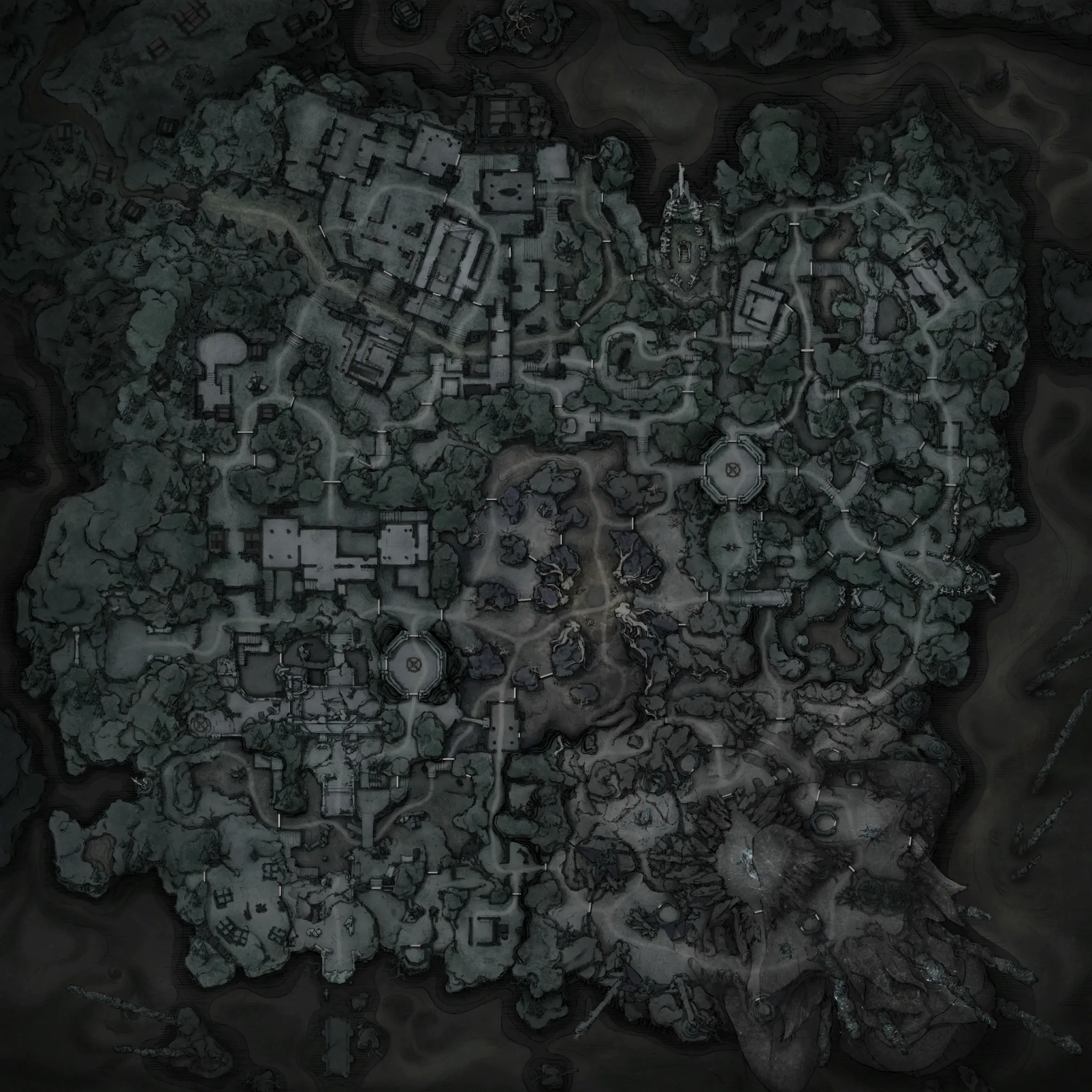
A real, coordinate-based Mistfall Hunter map for Hallowgrove and Brandrgarde with pan, zoom, search, extraction points, rift candidates, merchants, resurrection spots and spawn locations.

Maps
2
Points
314
Grid
10K

Hallowgrove field atlas

Beginner-friendly forest raid · 75 navigation points

Hallowgrove in-game map
White Woods · VillageGiant HighlandWhite Woods · OutskirtsWhite Woods · MountainWhite Woods · StorageGraveyardWhite Woods · CenterEast Residential
100%
MOVE CURSOR FOR COORDS
SCROLL TO ZOOM · DRAG TO PAN
32 / 75 points shown

Data note: map art is from the in-game atlas. Navigation positions are a current community dataset, not a guarantee that a random spawn or rift will activate in your match. Cross-check after patches.

Help replace unknowns with evidence

Found a repeatable task, boss or loot location?

Submit the landmark, route, spawn rule and paired screenshots. Candidate markers stay unpublished until the route can be reproduced.

Submit marker →

Mistfall Hunter Interactive Map FAQ

Is there an interactive map for Mistfall Hunter?

Yes. This atlas uses the real in-game map art and 314 normalized navigation coordinates across Hallowgrove and Brandrgarde. You can pan, zoom, search, filter layers, copy coordinates and share a direct link to a selected marker.

What locations are on the Mistfall Hunter map?

The first navigation release plots fixed escapes, warp-rift candidates, Soul Ferries, in-raid merchants, resurrection spots, spawn-in points and eight named areas on each map. Loot, monster and task layers will be added only after their coordinates are independently checked.

Are all warp-rift pins active in every match?

No. Warp-rift markers show candidate positions. A match opens only a subset of those positions, so use the layer to plan alternatives rather than treating every pin as a guaranteed exit.

How do the coordinates work?

Every marker has a normalized 0–10000 map-grid coordinate and the corresponding game-world X/Y coordinate. Move the cursor over the map to inspect either system, or select a marker to copy its values.

Does the map remember visited locations?

Yes. Select a marker and choose “Mark as visited.” Progress stays in the current browser without requiring an account. You can reset or change it marker by marker.

Coordinate provenance

What is real, and what can move

The base images are the game’s atlas art. Normalized marker positions and world-coordinate transforms were checked against the current public community map dataset. Fixed exits and area labels are stable; rifts, insertion points and some encounter systems choose from candidate positions at runtime.

Review the reference dataset →

Sources for this page

Keep reading